How to Download Facebook Videos with FSave Guide
Want to save Facebook videos in stunning 1080p, Full HD, or 4K quality? Unlike other tools that often lose sound, FSave.to guarantees a perfect download with full audio every time. No software installation needed because everything works smoothly right in your web browser.
Why FSave.to is your top choice for Facebook downloads
- Lightning-fast downloads that complete in just 3 to 4 seconds.
- Full access to private videos and closed group content.
- Convert Facebook to high-quality MP3 with just a single click.
- Compatible with all devices including PC, iPhone, and Android via web browser without any software installation.
- 100% free service with no usage limits or hidden fees for all features.
How to Download Facebook Videos: A Step-by-Step Guide
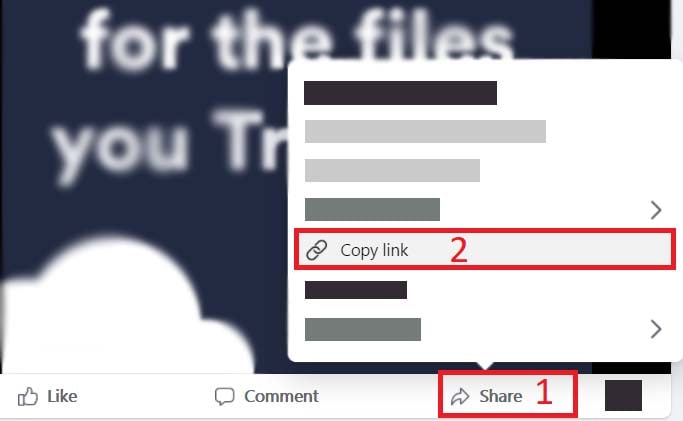
Step 1: Step 1: Obtain the Video Link
Navigate to the Facebook video or Reel you wish to save. Simply tap Share and choose Copy Link to capture the URL.
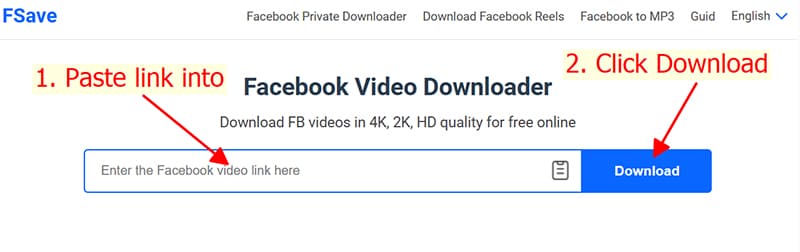
Step 2: Step 2: Insert the URL into FSave.to
Visit FSave.to, paste your link into the input field, and click Download to let the system process your video.
Step 3: Step 3: Pick Quality and Save
- Select your format: MP4 to download the video or MP3 if you want to convert to audio.
- Select resolution: from SD, 720p, 1080p, to 4K ultra-HD.
- For top-tier quality (HD+), click Render. The tool will merge video and audio together in just a few seconds.
- Finally, hit Download to save the file. Now you can enjoy your Facebook content offline anytime!
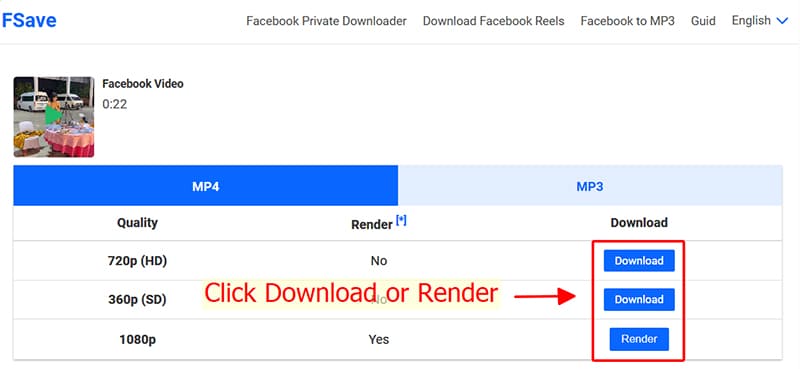
Note: For 4K and HD+ quality, Facebook splits video and audio tracks. FSave will automatically merge them into a single high-fidelity file for you.
Looking to capture videos from private groups? Check out our Private Facebook Downloader for a tailored guide on saving restricted content.